Final Exam Grade Calculator – What Score Do I Need?

 The Final Exam Grade Calculator helps students determine what score they need on a final exam to achieve a desired overall course grade. You can enter your current percentage directly or calculate it from weighted categories such as homework, quizzes, and projects. The calculator also supports converting points into percentages for common US gradebooks.
- What This Final Exam Calculator Does
- How to Use the Calculator (Step by Step)
- Inputs Explained: Final Weight, Current Grade, Target Grade
- Points to Percent: Convert Gradebook Points to a Percentage
- Build Your Current Grade From Weighted Categories
- How to Read the Results: Needed Score and Realism
- Tips and Common Mistakes (Weights, Rounding, Missing Categories)
- Questions and Answers
What This Final Exam Calculator Does
The Final Exam Grade Calculator is designed to help students quickly determine what score they need on a final exam to reach a specific overall course grade. This situation is common in US colleges and high schools, where the final exam often carries a significant weight — sometimes 20%, 30%, or even 40% of the total grade.
Instead of guessing or manually calculating formulas, this calculator shows the required final exam score instantly based on your current performance and grading structure. It works for both simple gradebooks (one overall percentage) and complex ones with multiple weighted categories such as homework, quizzes, midterms, and projects.
The calculator answers one core question students ask before finals: “What do I need on the final to get my target grade?”
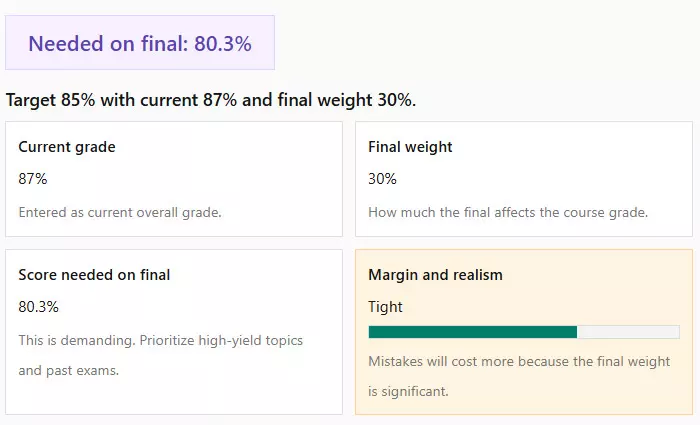
It is especially useful when:
- The final exam has a large impact on the final course grade
- Your gradebook shows multiple weighted components
- Your grades are listed as points instead of percentages
- You want to evaluate whether a target grade is realistic
| Situation | How the Calculator Helps |
|---|---|
| Final exam has high weight | Shows exactly how much the final affects your overall grade |
| Current grade is uncertain | Lets you compute it from weighted categories |
| Grades shown as points | Converts points into a usable percentage |
| Target grade feels unrealistic | Clearly indicates if the goal is achievable or not |
By visualizing both the required score and the level of difficulty, the calculator helps students make informed decisions about study effort, goal adjustments, and exam strategy.
How to Use the Calculator (Step by Step)
Using the Final Exam Grade Calculator takes only a minute. You do not need advanced math skills or knowledge of grading formulas — everything is handled automatically.

- Select a mode.
Choose “I know my current grade” if your gradebook already shows an overall percentage, or “Build from categories” if your grades are split into weighted components. - Set the final exam weight.
Enter how much the final exam counts toward your course grade (for example, 30% or 40%). - Enter your target grade.
This is the final course grade you want to achieve, such as 90% or 85%. - Provide your current performance.
Either enter your current overall grade directly or calculate it from categories like homework, quizzes, and projects. - Click “Calculate.”
The calculator instantly shows the score you need on the final exam.
| Input | What to Enter | Example |
|---|---|---|
| Final exam weight | Percentage of total grade | 35% |
| Target course grade | Desired final percentage | 90% |
| Current grade | Your grade before the final | 82% |
After calculation, the results section explains not only the required score, but also whether that score is reasonable, challenging, or mathematically impossible. This helps you decide whether to maintain your goal or adjust expectations before the final exam.
Inputs Explained: Final Weight, Current Grade, Target Grade
To get accurate results, it is important to understand what each input represents and how it affects the calculation. The Final Exam Grade Calculator mirrors the grading logic commonly used in US schools and universities.
Final Exam Weight
The final exam weight is the percentage of the total course grade assigned to the final exam. Typical values range from 20% to 40%, but some courses may assign a higher or lower weight.
Current Grade
Your current grade represents your performance before the final exam. This can be entered directly if your gradebook already shows a percentage, or calculated from categories in the alternative mode.
Target Course Grade
The target grade is the final percentage you want to achieve for the course. Many students choose common thresholds such as 90%, 85%, or 80%, but you can enter any value from 0 to 100.
| Input | Why It Matters | Common Mistake |
|---|---|---|
| Final exam weight | Determines how strongly the final affects your total grade | Forgetting that other categories make up the remaining percentage |
| Current grade | Sets the baseline before the final exam | Using a grade that already includes the final |
| Target grade | Defines the goal the calculator works toward | Choosing an unrealistic target without checking feasibility |
If any of these values are incorrect, the required final exam score will also be inaccurate. Taking a moment to verify your inputs can save confusion later.
Points to Percent: Convert Gradebook Points to a Percentage
Many US gradebooks do not show percentages directly. Instead, they display grades as points earned out of total points, such as 420 / 500. The calculator includes a built-in converter to handle this common situation.
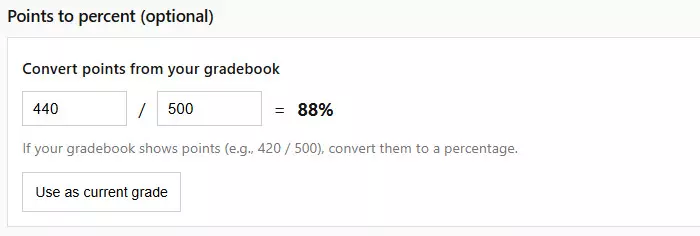
To convert points into a percentage:
- Enter the number of points you have earned so far.
- Enter the total possible points.
- The calculator automatically converts the result into a percentage.
- Apply that percentage as your current grade with one click.
| Points Earned | Total Points | Converted Percentage |
|---|---|---|
| 420 | 500 | 84% |
| 275 | 300 | 91.7% |
| 180 | 250 | 72% |
This feature is especially helpful when your gradebook mixes point-based grading with weighted percentages. By converting points correctly, you ensure the final exam calculation reflects your true standing in the course.
Build Your Current Grade From Weighted Categories
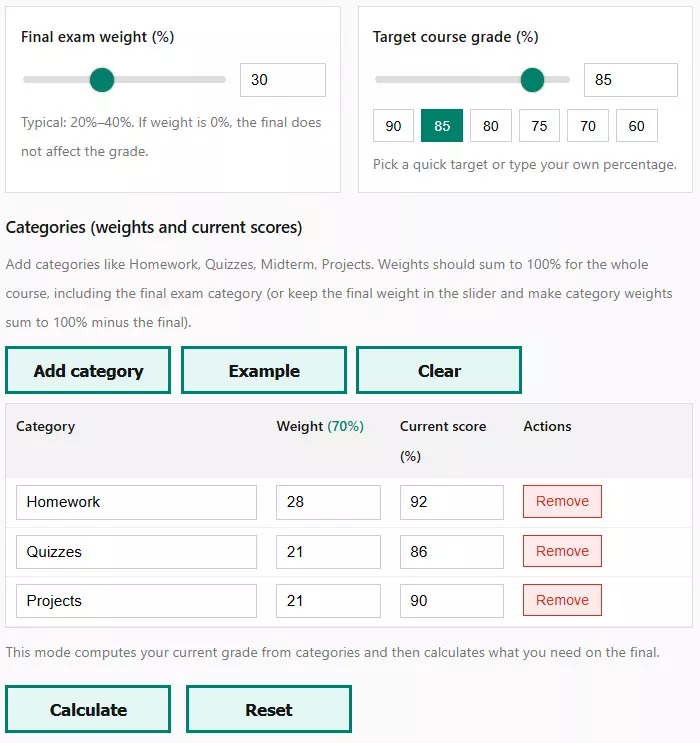
If your gradebook does not provide a single overall percentage, the calculator allows you to build your current grade from weighted categories. This reflects how many US courses structure grading across multiple components.
Common categories include homework, quizzes, midterms, labs, projects, and participation. Each category has its own weight and current score. The calculator combines them into one accurate current grade.
To use this mode:
- Add each grading category listed in your syllabus.
- Enter the weight for each category (excluding the final exam).
- Enter your current score for each category.
- Make sure the total weight matches 100% minus the final exam weight.
| Category | Weight (%) | Current Score (%) |
|---|---|---|
| Homework | 25 | 92 |
| Quizzes | 20 | 86 |
| Projects | 20 | 90 |
Once entered, the calculator automatically computes your current overall grade using weighted averages. This value is then used to determine what score you need on the final exam.
This mode is especially useful when instructors update grades category by category or when some components are completed later in the term.
How to Read the Results: Needed Score and Realism
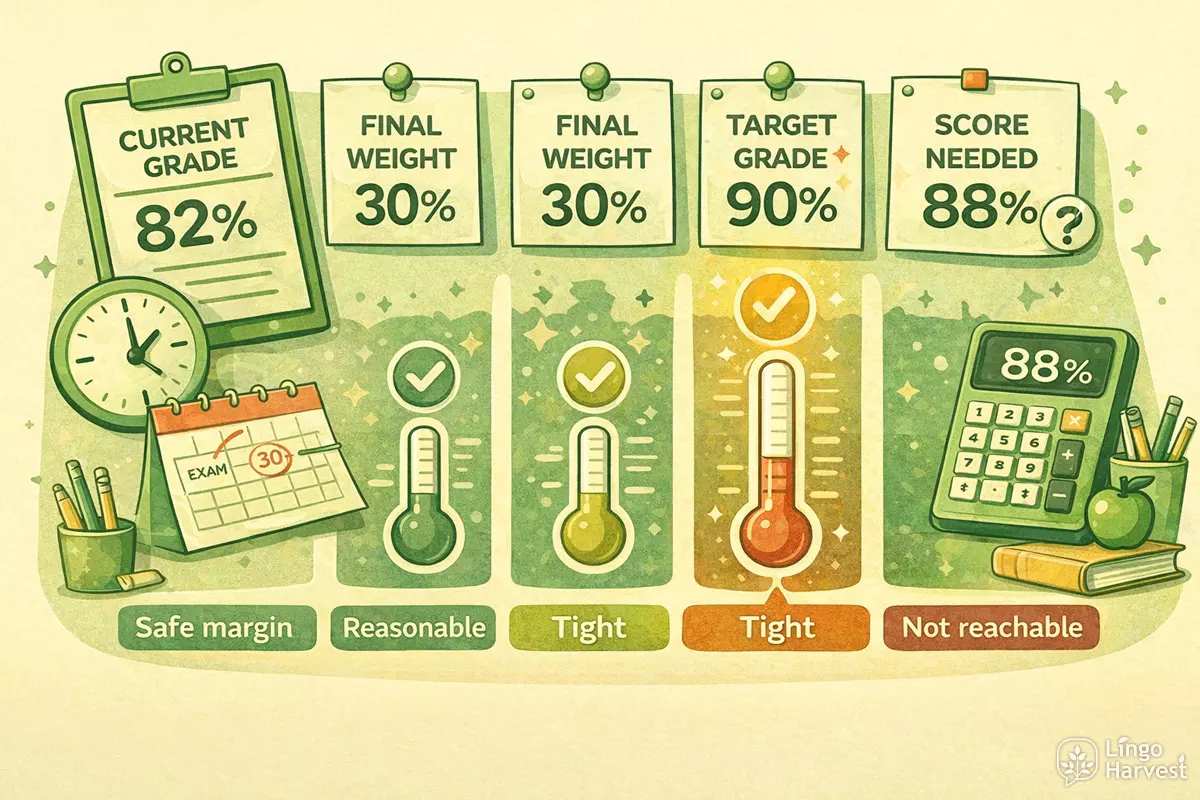
After clicking Calculate, the results section presents more than just a number. It is designed to help you understand both the required final exam score and how realistic that goal is.
The calculator shows:
- Your current grade before the final exam
- The weight of the final exam
- The exact percentage needed on the final
- A realism indicator based on difficulty
The realism indicator groups outcomes into clear categories:
- Safe margin – even a low score keeps you above the target
- Reasonable – achievable with normal preparation
- Tight – requires focused study and few mistakes
- High risk – near-perfect performance needed
- Not reachable – mathematically impossible with current inputs
This interpretation helps you decide whether to keep your target grade, adjust expectations, or increase preparation time. Instead of guessing, you can make data-driven decisions before your final exam.
Tips and Common Mistakes (Weights, Rounding, Missing Categories)
Even a small input error can significantly change the required final exam score. The tips below help you avoid the most common mistakes students make when using a final exam calculator.
- Do not include the final exam in your current grade.
Your current grade should reflect performance before the final. Including it twice will inflate the result. - Check that category weights add up correctly.
In category mode, weights must sum to 100% minus the final exam weight. - Use percentages, not letter grades.
Convert A, B+, or point totals into percentages first. - Watch out for rounding.
Gradebooks may round differently than instructors. Use your syllabus rules if stated. - Be realistic about targets.
If the calculator shows over 100%, the goal is mathematically impossible without changes to grading components.
Using accurate inputs ensures the calculator reflects your real situation and helps you plan study time more effectively.
Questions and Answers
- What if my required final exam score is over 100%?
This means your target course grade cannot be reached based on your current grade and the final exam weight. To change this, you would need to lower your target grade or improve other graded components if your instructor still allows it. - Can I use this final exam grade calculator for US college courses?
Yes. The calculator is built around grading systems commonly used in US high schools and universities, including weighted categories, cumulative grading, and point-based gradebooks. - What if my gradebook uses points instead of percentages?
You can convert points (for example, 420 out of 500) into a percentage using the built-in points-to-percent converter and apply the result directly as your current grade. - Should I include the final exam in my current grade?
No. Your current grade should reflect only the work completed before the final exam. Including the final twice will distort the calculation and produce incorrect results. - What if my course has multiple finals or a final project instead?
If multiple exams or a final project are grouped under one category, use their combined weight as the final exam weight and treat the rest as regular categories. - How accurate is the required score shown by the calculator?
The result is mathematically accurate based on the inputs you provide. However, instructors may apply rounding rules or grading curves that slightly change the final outcome. - Can I calculate my grade if some categories are not finished yet?
Yes. Enter the current scores for completed work. The calculator estimates your standing based on available data, which is useful for planning before all grades are posted. - Does this calculator work for high school final exams?
Yes. The logic applies to both high school and college courses as long as the grading system uses weighted percentages or cumulative scores. - What if my professor applies a grading curve?
Grading curves are not predictable in advance. Use the calculator without a curve to understand the baseline requirement, then treat any curve as a possible bonus. - Why does my result differ from other online calculators?
Some calculators assume fixed weights or simplify category handling. This calculator allows flexible weights and category-based inputs, which can lead to more accurate results.