Final Grade Calculator — Predict Your Final Score

 Use this Final Grade Calculator to estimate your course outcome or determine the exam score required to reach your target grade. Enter your current grade, exam weight, and expected or target score to get instant results. Includes a points-to-percent converter for gradebooks that use points instead of percentages.
What This Calculator Can Do
This Final Grade Calculator helps you answer two practical questions in seconds:
- “Where will I likely finish?” — predict your final course grade using your current grade, final exam weight, and an expected final exam score.
- “What do I need on the final?” — calculate the minimum final exam score required to reach a target final grade.
It also includes a built-in Points to Percent converter, so you can turn gradebook points (like 420 / 500) into a percentage and apply it directly to any input field.
| Feature | What it helps you do |
|---|---|
| Predict final grade | Estimate your overall course result based on your expected final exam performance |
| Required score on final | Find the minimum exam score needed to reach a target final grade |
| Automatic coursework weight | Coursework weight updates as 100 − final exam weight to prevent mistakes |
| Points to Percent converter | Convert gradebook points to % and apply to Current grade, Expected final, or Target grade |
| Instant updates | Results refresh automatically when inputs are valid — no manual “Calculate” step needed |
How “Predict Final Grade” Works
Use this mode when you want to estimate your final course grade based on how you think you will perform on the final exam.
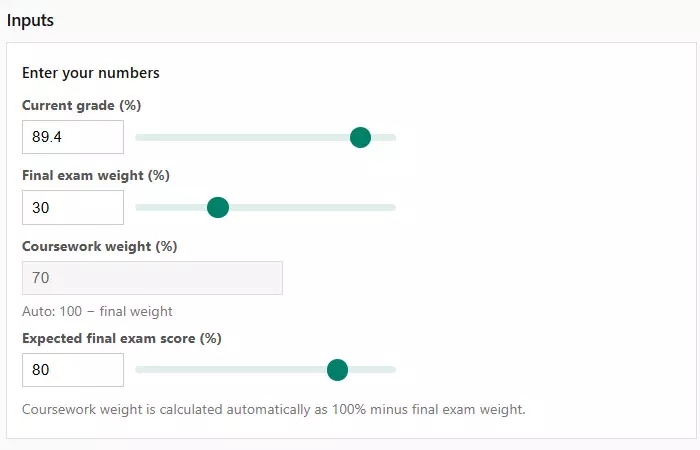
You enter:
- Current grade (%) — your grade so far, before the final exam.
- Final exam weight (%) — how much the final exam counts toward the overall grade.
- Expected final exam score (%) — your realistic estimate for the final exam.
The calculator treats your course as two parts — coursework and the final exam — and combines them using a weighted average.
| Input | Typical source | Example |
|---|---|---|
| Current grade (%) | Course gradebook / LMS | 89.6% |
| Final exam weight (%) | Syllabus / course policy | 30% |
| Expected final exam score (%) | Your estimate (practice tests, past exams) | 80% |
| Coursework weight (%) | Auto-calculated as 100 − final weight | 70% |
Formula used (weighted average):
- Final grade = (Current grade × Coursework weight + Expected final × Final weight) ÷ 100
The result is shown as a percentage and paired with a simple status message (for example, On track or Borderline) to help you interpret the number quickly.
How “Required Score on Final” Works
Use this mode when you already have a target final grade in mind and want to know what score you must earn on the final exam to reach it.
This is especially useful near the end of the term, when you need to decide whether a goal is realistic or how much effort the final exam will require.
You enter:
- Current grade (%) — your grade before the final exam.
- Final exam weight (%) — how much the final exam counts toward the total grade.
- Target final grade (%) — the overall grade you want to finish with.
The calculator then works backward to determine the minimum final exam score needed to hit your target.
| Scenario | What the result means |
|---|---|
| Required score ≤ 70% | The goal is achievable with an average or solid exam performance |
| Required score 70–90% | The goal is challenging and requires strong preparation |
| Required score > 100% | The target grade is mathematically unreachable |
| Required score ≤ 0% | The target grade is already secured without the final exam |
If the required score exceeds 100%, the calculator clearly indicates that the target cannot be reached, even with a perfect final exam score.
How to Enter Your Inputs
All inputs in this calculator are designed to be flexible and error-resistant. You can type values manually or adjust them using sliders.
Key input rules:
- All grades and weights must be between 0 and 100.
- Decimal values are allowed for grades (for example, 89.6).
- Final exam weight is rounded to whole percentages to match most course policies.
The Coursework weight field is calculated automatically as:
- Coursework weight = 100 − Final exam weight
This prevents mistakes and ensures the total always equals 100%.
| Input field | Accepted format | Notes |
|---|---|---|
| Current grade | 0–100, decimals allowed | Use your most up-to-date grade from the gradebook |
| Final exam weight | 0–100, whole numbers | Check the syllabus for the exact percentage |
| Expected final score | 0–100, decimals allowed | Used only in Predict Final Grade mode |
| Target final grade | 0–100, decimals allowed | Used only in Required Score mode |
As soon as all required inputs are valid, the calculator updates results automatically — there is no need to press a separate calculate button.
Points to Percent Converter
Many courses use a points-based grading system instead of percentages. If your gradebook shows results like 420 / 500, this calculator can convert those points into a percentage automatically.
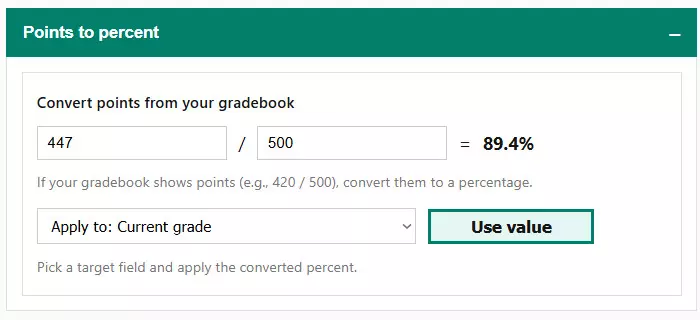
To use the converter:
- Enter the earned points.
- Enter the total possible points.
- The calculator instantly converts the result into a percentage.
- Select which field to apply the value to (Current grade, Expected final score, or Target grade).
Once applied, the percentage is inserted into the selected field and the results update automatically.
| Points input | Converted percent | Common use case |
|---|---|---|
| 420 / 500 | 84% | Midterm or coursework total |
| 180 / 200 | 90% | Final project or major assignment |
| 75 / 100 | 75% | Quiz or smaller assessment |
This feature helps eliminate manual math errors and ensures your inputs accurately reflect your gradebook data.
Understanding Results & Status
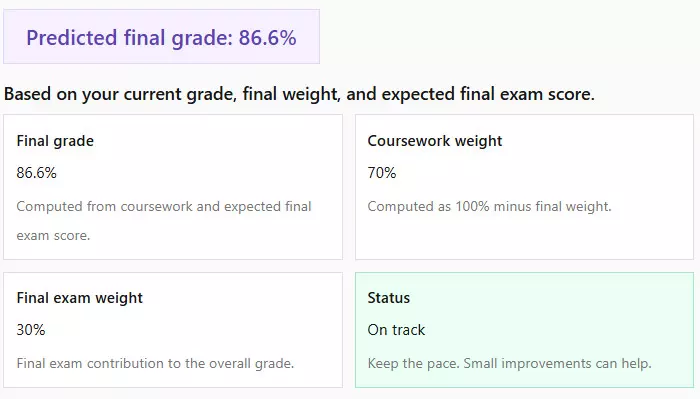
The calculator does more than display numbers — it also provides a status indicator to help you quickly understand what the result means.
In Predict Final Grade mode, the status reflects how strong your projected outcome is based on typical grading thresholds.
In Required Score mode, the status explains whether your target grade is achievable and how demanding the final exam will be.
| Status | Meaning | Action suggestion |
|---|---|---|
| Strong / On track | Your projected or required score is comfortable | Maintain current study pace |
| Borderline / Challenging | You are close to common thresholds | Focus on weak topics before the exam |
| At risk / Very demanding | The required performance is high | Plan intensive revision and practice |
| Not reachable | The target cannot be achieved mathematically | Adjust expectations or course strategy |
These contextual messages are designed to help you interpret results quickly and decide on your next steps without guessing.
Reset, Tips, and Common Mistakes
This calculator is designed to prevent most common grading mistakes, but a few practical tips can help you get the most accurate results.
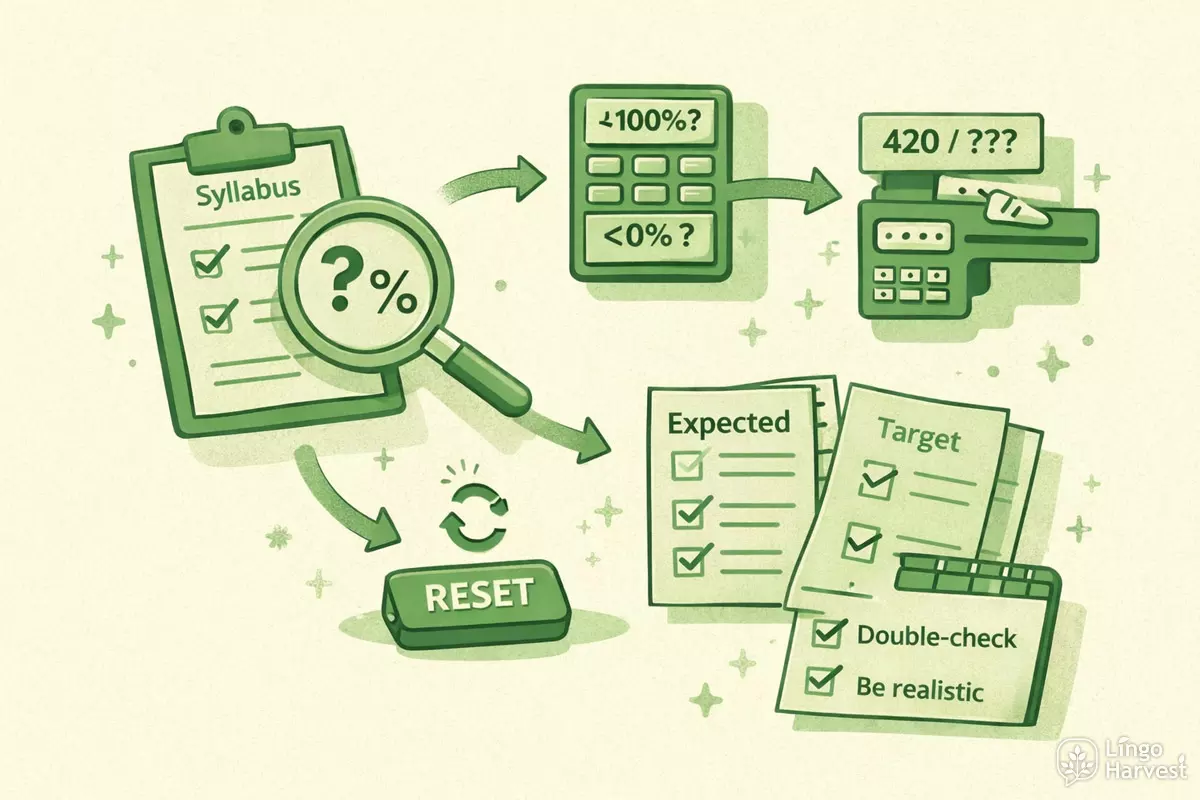
Helpful tips:
- Always double-check the final exam weight in your syllabus — this value has the biggest impact.
- Use realistic estimates for the expected final exam score, not best-case scenarios.
- If your gradebook uses points, always convert them using the built-in converter instead of guessing.
Common mistakes to avoid:
- Entering percentages above 100 or below 0.
- Forgetting that coursework weight is automatically calculated.
- Confusing expected final score with target final grade.
If you want to start over at any time, use the Reset button. It restores example values so you can quickly test different scenarios again.
Popular Questions & Answers
- Does this calculator work for any grading system?
Yes. As long as your course uses percentage-based weighting for coursework and the final exam, the calculator will work correctly. - What grading formula does the calculator use?
It uses a standard weighted average formula that combines coursework and final exam scores based on their respective weights. - Can I use decimal grades like 89.6%?
Yes. The calculator supports decimal values for grades and automatically rounds results to one decimal place. - What if my required final score is over 100%?
This means the target grade is mathematically unreachable, even with a perfect final exam score. - What happens if the final exam weight is 0%?
In that case, your final grade is entirely based on coursework, and the required-score mode cannot be calculated. - Can I apply converted points to different fields?
Yes. You can apply the converted percentage to your current grade, expected final exam score, or target final grade, depending on the selected mode. - Can I use this calculator before all coursework is graded?
Yes. Use your current average based on completed assignments to estimate possible outcomes. - Does this calculator replace my official course grade?
No. It provides an estimate only. Your official grade is determined by your institution. - Do I need to click a calculate button?
No. Results update automatically as soon as all required inputs are valid.