CEFR Vocabulary Level Checker – Analyze English Words A1–C2

 This CEFR Vocabulary Level Checker analyzes English word lists and assigns CEFR levels from A1 to C2. It shows dominant and median levels, word distribution, known and unknown vocabulary, and overall coverage. Ideal for students, teachers, writers, and anyone evaluating English vocabulary difficulty.
What This CEFR Vocabulary Level Checker Does
This tool helps you quickly estimate the CEFR level of an English word list — from A1 to C2 — and see how your vocabulary is distributed across levels. Instead of guessing whether your list is “beginner” or “advanced”, you get a clear breakdown with counts, percentages, and a list of words that are not recognized by the CEFR dataset.
If you need to analyze full English texts instead of individual word lists, you can use our CEFR text analysis tool. It is designed for checking complete texts (up to 10,000 words) and focuses on overall vocabulary difficulty within real sentences and context.
It is especially useful when you work with:
- study word lists (from courses, textbooks, flashcards)
- vocabulary extracted from articles, essays, or subtitles
- topic or industry terms that may fall outside CEFR lists
The output is designed to answer three practical questions:
- What level dominates my list? (Dominant level)
- How balanced is the vocabulary? (Distribution table)
- Which words are missing from CEFR lists? (Unknown words)
| Result Block | What It Tells You |
|---|---|
| Dominant level + median | The most common CEFR level and the middle level across your list |
| Distribution | How many words fall into A1, A2, B1, B2, C1, C2, and UNK |
| Unknown words | Words not found in the CEFR lists (names, slang, typos, rare terms) |
| Per-word results | Each word with its CEFR label and count (depends on count mode) |
How to Use the Tool
The checker works with simple input: paste your words, choose a count mode, then click Analyze. You can enter one word per line or use comma-separated lists — punctuation is ignored.
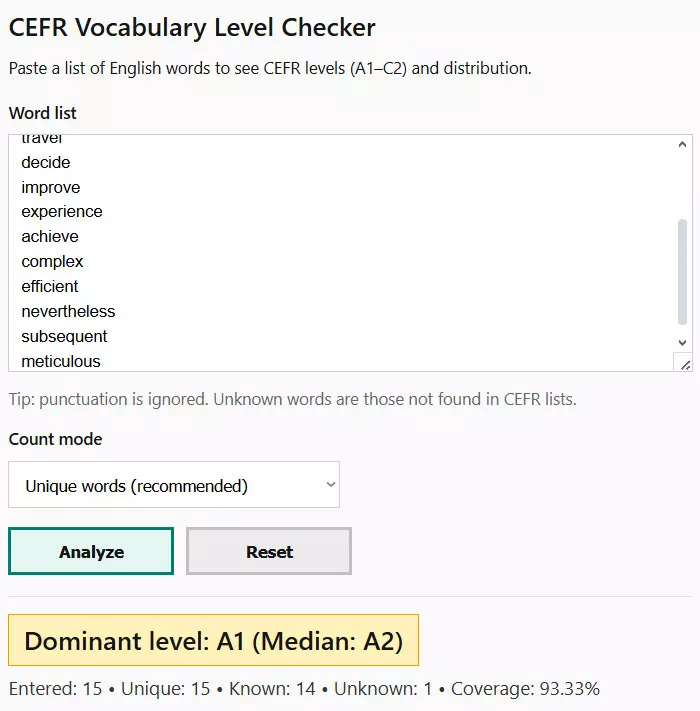
- Paste your word list into the text box.
- Select Unique words if you want a clean vocabulary profile (recommended for most cases).
- Select All occurrences
- Click Analyze
- Use Reset
If your list comes from a text, you can paste the extracted words (or a rough list) and use All occurrencesUnique words
| Input Type | Best Count Mode |
|---|---|
| Flashcards / study list | Unique words |
| Vocabulary from a text | All occurrences |
| Topic list (business, IT, science) | Unique words |
| Exam prep word list | Unique words |
Unique Words vs All Occurrences
The count mode changes how the calculator interprets your word list. This choice directly affects the distribution, dominant level, and coverage percentage, so it is important to understand the difference.
Unique words means each word is counted once, no matter how many times it appears. This mode shows the real breadth of your vocabulary and is best for learning and assessment.
All occurrences means repeated words are counted multiple times. This mode reflects frequency and is useful when analyzing vocabulary taken from texts.
| Mode | What It Measures | Best Use Case |
|---|---|---|
| Unique words | Vocabulary range and level diversity | Study lists, flashcards, course units |
| All occurrences | Word frequency and repetition | Texts, articles, essays, transcripts |
In most situations, Unique words is recommended because CEFR is designed to describe knowledge of words, not how often they repeat in a single text.
How to Read the Results
After analysis, the tool displays several result blocks. Each block answers a different question about your vocabulary.
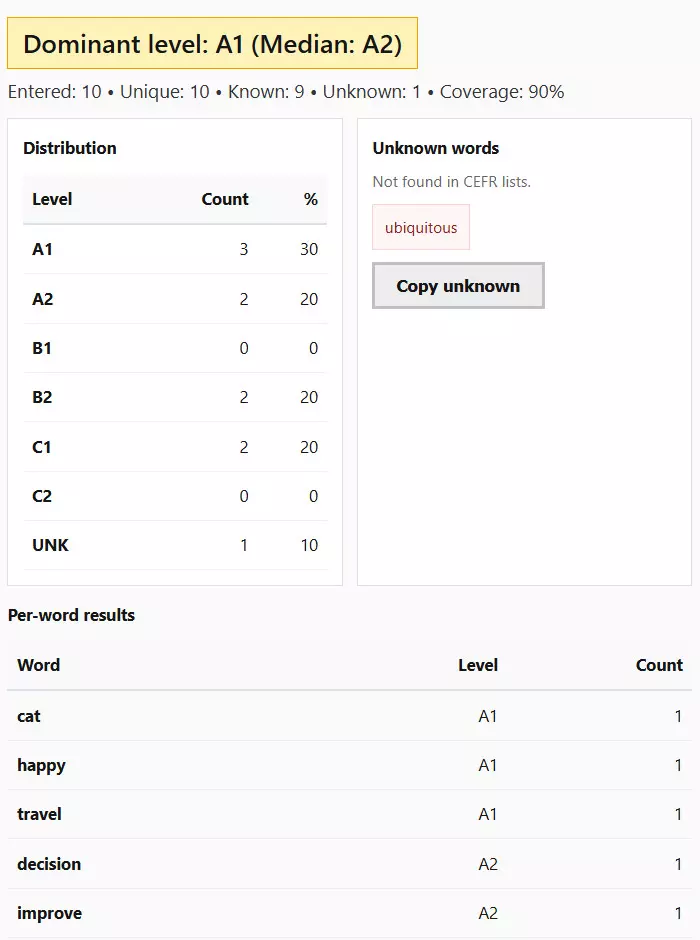
The summary at the top shows the dominant level and median level. The dominant level is the CEFR level with the highest number of words. The median level represents the middle point of your vocabulary distribution.
| Metric | Meaning |
|---|---|
| Dominant level | The CEFR level that appears most often in your list |
| Median level | The middle level when all words are ordered by difficulty |
| Coverage | Percentage of words found in CEFR lists |
| Unknown count | Number of words outside CEFR classification |
The distribution table shows how your words are spread across A1–C2 and UNK. A balanced distribution usually indicates mixed difficulty, while a strong peak at one level suggests focused or targeted vocabulary.
The per-word table at the bottom lists every word with its CEFR level and count. This makes it easy to spot outliers, advanced vocabulary, or unexpectedly basic words.
Unknown Words: What They Mean
Unknown words are labeled as UNK. This does not mean the word is incorrect or useless. It simply means the word is not present in standard CEFR vocabulary lists.
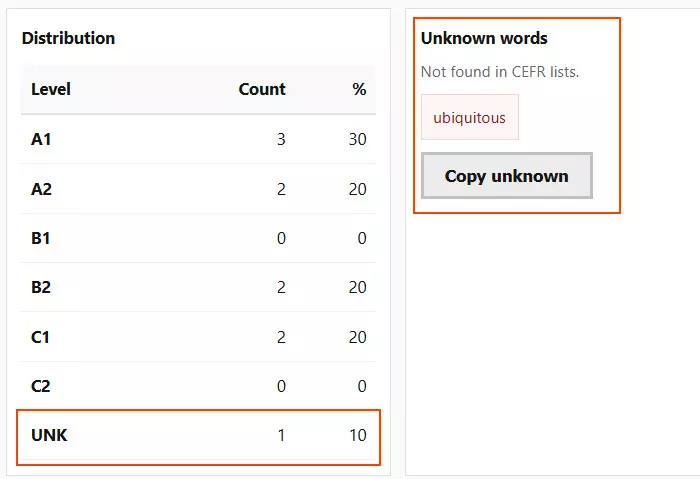
Common reasons words appear as unknown:
- proper nouns (names, places, brands)
- highly technical or niche terminology
- recent slang or informal expressions
- spelling variants or typos
The calculator shows unknown words separately so they do not distort your CEFR distribution. You can also copy them as a clean list and review them manually.
If your list contains many unknown words, this often indicates specialized or domain-specific vocabulary rather than poor English.
How to Improve Your CEFR Vocabulary Level
Use the results not just for analysis, but for action. The distribution helps you decide what to study next.

Practical strategies based on your results:
- If most words are A1–A2, focus on core B1 vocabulary to improve comprehension.
- If your list peaks at B1–B2, add C1 words in context rather than isolated memorization.
- If you see many C1–C2 words, check usage accuracy and collocations.
- Review unknown words and decide which ones are worth learning.
Repeating the analysis over time lets you track progress and keep your vocabulary development balanced and intentional.
Who This Tool Is Best For
This CEFR Vocabulary Level Checker is designed for anyone who needs a fast, reliable way to evaluate English vocabulary difficulty without reading full texts or running complex linguistic analysis.
| User Type | How the Tool Helps |
|---|---|
| English learners | See which CEFR levels dominate your personal vocabulary lists |
| Teachers | Check if lesson or unit vocabulary matches the target CEFR level |
| Content writers | Validate vocabulary difficulty before publishing learning materials |
| Exam candidates | Analyze IELTS, TOEFL, or Cambridge word lists |
| Curriculum designers | Balance vocabulary progression across levels |
The tool focuses on clarity and practical output, making it useful even if you are not familiar with CEFR methodology in detail.
Example Word Lists to Try
If you are unsure what to paste into the analyzer, start with simple, realistic word lists. The goal is to evaluate vocabulary sets you actually learn, teach, or use.
Good examples include:
- a vocabulary list from one textbook unit
- words collected from an article or blog post
- personal flashcard or note-based word lists
- exam preparation vocabulary (IELTS, TOEFL, FCE, CAE)
- topic-based lists such as business, IT, or science terms
For best results, keep lists focused. Very short lists may not show meaningful distribution, while extremely large lists may hide useful patterns.
FAQ
1. What exactly does this CEFR Vocabulary Level Checker analyze?
The tool analyzes individual English words and matches them to CEFR levels from A1 to C2. It does not evaluate grammar, sentence structure, or overall fluency — only vocabulary level and distribution.
2. Is this tool suitable for analyzing full texts?
No. The checker works with word lists only. To analyze a text, you should first extract the vocabulary from it, then paste the words into the tool for analysis.
3. How accurate are the CEFR levels assigned to words?
The levels are based on established CEFR-aligned vocabulary lists. While individual word difficulty may vary by context, the classifications are reliable for general learning, teaching, and assessment purposes.
4. What does the dominant CEFR level mean?
The dominant level is the CEFR level that appears most frequently in your word list. It shows the overall difficulty focus of the vocabulary you are analyzing.
5. How is the median level different from the dominant level?
The median level represents the middle point of your vocabulary when words are ordered by difficulty. It helps balance the picture if your list contains both very easy and very advanced words.
6. Why do some correct English words appear as unknown (UNK)?
Words appear as unknown if they are not included in standard CEFR vocabulary lists. This often includes proper names, technical terms, recent slang, or highly specialized vocabulary.
7. Should I remove unknown words before interpreting the results?
Not necessarily. Unknown words are separated so they do not distort CEFR distribution. Reviewing them can help you decide which words are relevant to your learning or teaching goals.
8. Which count mode should I use for most situations?
Unique words is recommended in most cases because it reflects actual vocabulary knowledge rather than repetition frequency. Use All occurrences mainly for text-based analysis.
9. Can I use this tool to track vocabulary progress over time?
Yes. By analyzing updated word lists regularly, you can compare distributions and see how your vocabulary gradually shifts toward higher CEFR levels.
10. Is this tool useful for exam preparation?
Yes. It helps you check whether your vocabulary aligns with the expected CEFR range for exams such as IELTS, TOEFL, FCE, CAE, or other proficiency tests.
11. Does a higher CEFR vocabulary level mean better English overall?
No. Vocabulary is only one component of language proficiency. Grammar, pronunciation, listening, speaking, and writing skills are equally important and are not measured by this tool.
12. Can teachers use this tool for lesson planning?
Yes. Teachers can analyze lesson vocabulary in advance to ensure it matches the target CEFR level and avoid introducing overly complex or overly simple words.